Attributes & categories
The entire data set is built on three levels. Once you understand this model, you know exactly what happens during an import or ERP sync.
The data model
Category         (grouping/heading, e.g. "Material & Aufbau")
  └── Attribute        (the definition, e.g. "Material")
        └── Value      (the actual value per product/variant, e.g. "WPC")
- Category – a heading that attributes are grouped under in the storefront. Global to the store, optional.
- Attribute – the actual property ("the key"): has a key, a label, an optional unit, a value type and an optional category. Global to the store.
- Value – the concrete value of an attribute on one product or one variant.
Attributes and categories are master data and are maintained once per store. The values, by contrast, are attached to individual products/variants.
Fields of an attribute
| Field | Meaning |
|---|---|
| Key | Technical, unique identifier (e.g. nutzbreite). Reference for import and ERP. |
| Label | Display name in the storefront (e.g. "Nutzbreite"). |
| Unit | Optional unit shown after the value (e.g. mm, V). |
| Value type | Determines how the value is interpreted and displayed (see below). |
| Category | Optional assignment to a category for grouping in the storefront. |
| Status | Active or Inactive – only active attributes appear in the storefront. |
Value types
Every attribute has exactly one value type:
| Value type | Example | Display in the storefront |
|---|---|---|
string | WPC | text as-is |
number | 230 | number, optionally with unit (e.g. "230 V") |
boolean | true | "Yes" / "No" |
richtext | formatted text | output as text |
During import, values are automatically converted to their value type. For boolean, true/1/ja/yes count as "Yes" and false/0/nein/no as "No". If a value doesn't match its value type (e.g. abc for a number attribute), validation reports it as an error.
Viewing the catalog
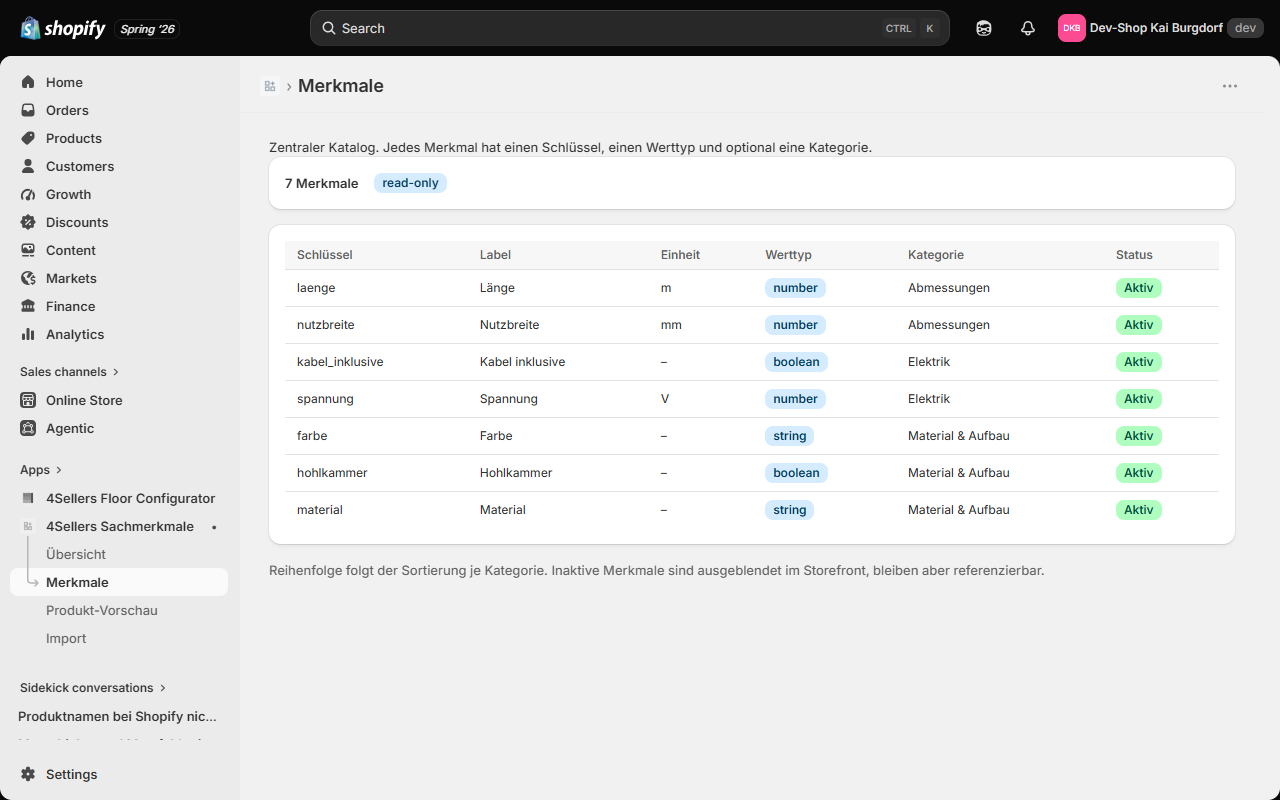
In the Attributes area you see the full catalog read-only: key, label, unit, value type, category and status. The display follows the sort order per category.
Note: The attribute list is intentionally read-only. Attributes, categories and values are created and changed via Import or the ERP interface – keeping a single, traceable source for changes.
Active and inactive
An inactive attribute is not shown in the storefront, but it stays in the catalog and remains referenceable. This lets you hide an attribute temporarily without losing its values. An import does not silently reactivate an inactive attribute – this is a deliberate safeguard.
Continue to Import values.