Import values
The Import area loads attributes and values from a file or pasted text. Before every import, each row is validated and shown to you in a preview – only then are the data written.
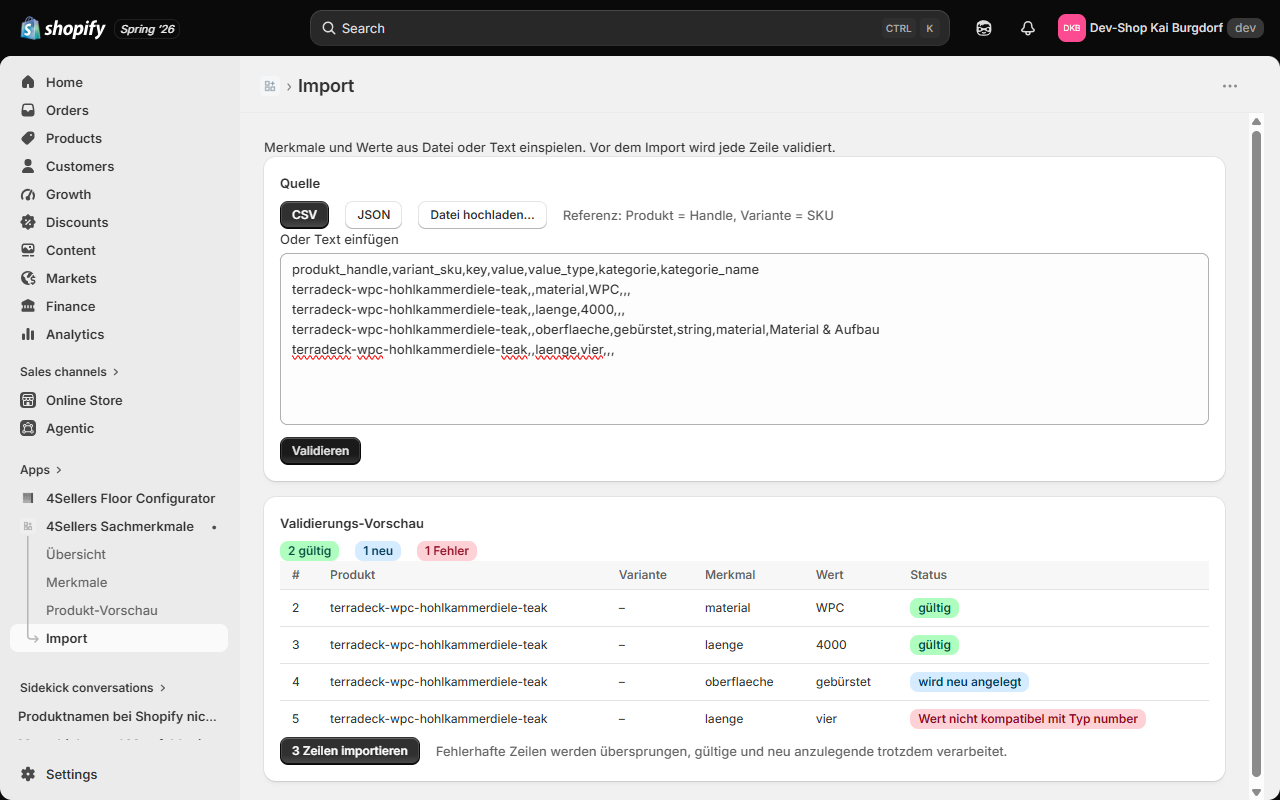
The flow in brief
- Choose a format: CSV or JSON.
- Upload a file or paste the data directly into the text box.
- Click Validate – the preview shows the status per row.
- Click Import … rows to apply valid rows and rows to be created.
Rows with errors are skipped during import; valid rows and rows to be created are processed anyway.
Referencing: product and variant
- A product is referenced by its handle (
produkt_handle). - A variant is referenced by its SKU (
variant_sku). - If no SKU is given, the value applies to the product (and is inherited by all variants).
Columns (CSV) / fields (JSON)
| Column / field | Required | Meaning |
|---|---|---|
produkt_handle | yes | Handle of the product |
key | yes | Key of the attribute |
value | yes | The value (raw, converted per value type) |
variant_sku | no | SKU of the variant (otherwise the value applies to the product) |
value_type | only for a new attribute | Value type: string, number, boolean or richtext |
label | no | Display name for an attribute to be created |
einheit | no | Unit for an attribute to be created |
kategorie | no | Key of the category |
kategorie_name | no | Display name of a category to be created |
sortierung | no | Sort position (number) |
For an existing attribute, value_type, label, einheit etc. are ignored – the import never changes existing attribute definitions, only their values.
Creating new attributes automatically
If a row references a key that doesn't exist yet, that's not an error: the row is a creation candidate. It requires a valid value_type that the value can be converted to. Missing categories are also created during import.
Example (CSV)
produkt_handle,variant_sku,key,value,value_type,kategorie,kategorie_name
terradeck-wpc-hohlkammerdiele-teak,,material,WPC,,,
terradeck-wpc-hohlkammerdiele-teak,,hohlkammer,true,,,
terradeck-wpc-hohlkammerdiele-teak,,nutzbreite,150,,,
terradeck-wpc-hohlkammerdiele-teak,,oberflaeche,gebürstet,string,material,Material & Aufbau
Example (JSON)
[
  { "produkt_handle": "terradeck-wpc-hohlkammerdiele-teak", "key": "material", "value": "WPC" },
  { "produkt_handle": "terradeck-wpc-hohlkammerdiele-teak", "key": "hohlkammer", "value": "true" },
  { "produkt_handle": "terradeck-wpc-hohlkammerdiele-teak", "key": "nutzbreite", "value": "150" },
  {
    "produkt_handle": "terradeck-wpc-hohlkammerdiele-teak",
    "key": "oberflaeche",
    "value": "gebürstet",
    "value_type": "string",
    "kategorie": "material",
    "kategorie_name": "Material & Aufbau"
  }
]
Reading the validation preview
After validating, each row shows a status:
| Status | Meaning |
|---|---|
| valid | Attribute exists and is active, value matches the value type – will be applied. |
| new | Attribute doesn't exist yet and will be created – will be applied. |
| error | e.g. inactive attribute, value doesn't match the value type, required column missing – will be skipped. |
After the import, a banner shows how many values were created/updated and how many attributes/categories were newly created.
Afterwards, check the result in the Product preview.